Works inside the LMS you already use.

Turn your learning materials into video walkthroughs, instant summaries, quizzes, and an AI chatbot, plus the comprehension analytics your LMS does not track. Deploys as standard SCORM or LTI 1.3 into your LMS.
ISO 27001 SOC 2 secured SCORM LTI 1.3
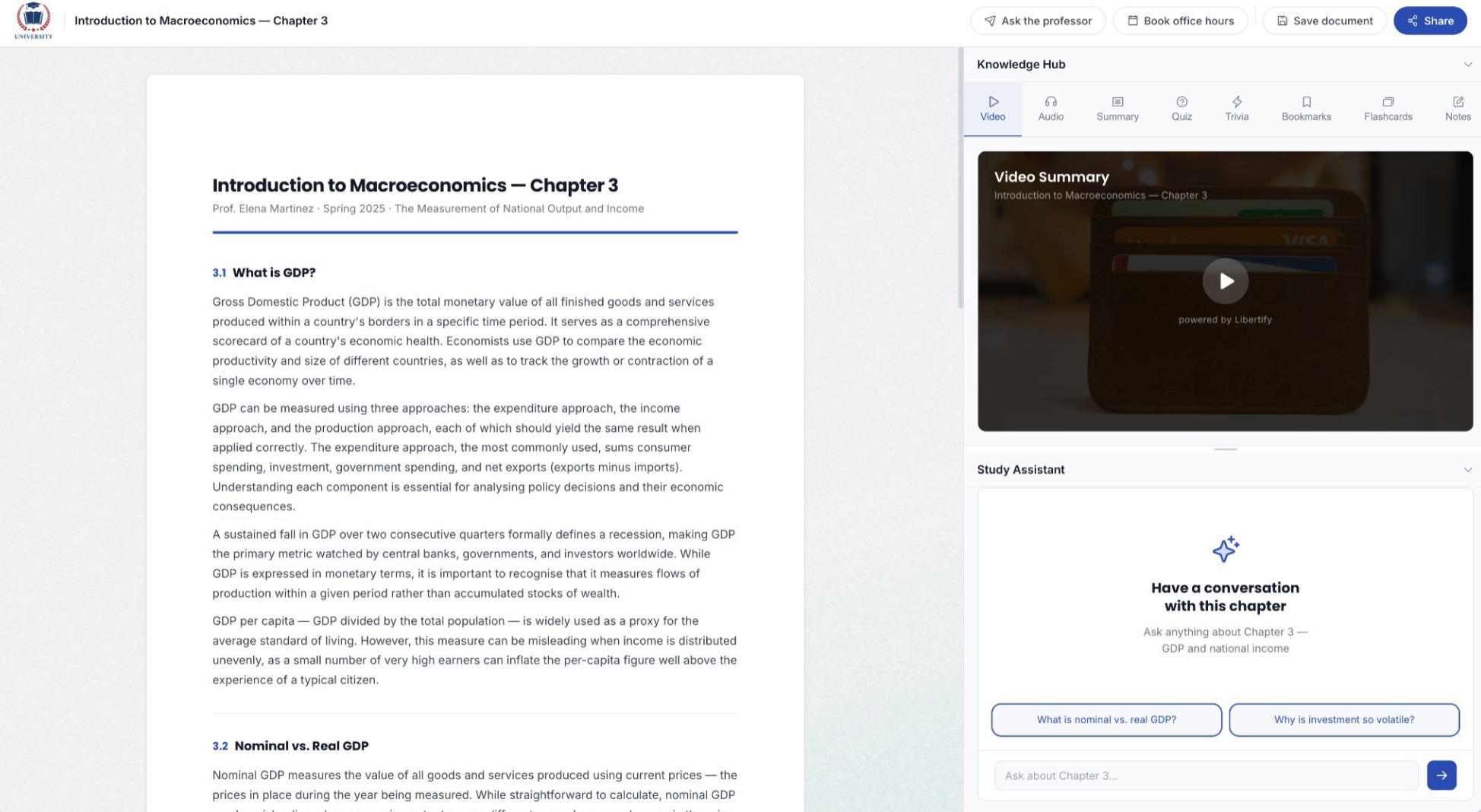
Libertify embedded inside an LMS course, showing the Document Explorer, Knowledge Hub, and chatbot

Works on top of your LMS

Partner
New
SCORM LTI 1.3

Three steps. Live in your LMS.

Upload what you already have. We turn it into something people actually use. It deploys through standard SCORM or LTI 1.3, no custom development needed.

01

Start with what you already have

Drag in the PDFs, decks, or documents your team already uses to train people. Nothing to rebuild from scratch.

02

We turn it into something people actually use

Libertify builds the video walkthrough, summary, and quiz for you, and adds a chatbot your learners can ask questions to directly.

03

It shows up right where your learners already are

Export as a SCORM package or launch through LTI 1.3. It drops into the LMS you already use, the same day.

See it live inside Moodle

Implement it into your LMS. 15-minute walkthrough. Book a demo →

Most LMS dashboards tell you the course was opened. We tell you what they didn't understand.

Three signals no completion checkbox captures: what they engaged with, where they got stuck, and what they still cannot explain back. This is the comprehension data your LMS was never built to show.

Comprehension

Video, scenario check, quick recall: every format tracked on its own. See exactly which one the material actually lands with.

Conversation

Every question, logged. See exactly what is still unclear, grounded only in the material they were studying.
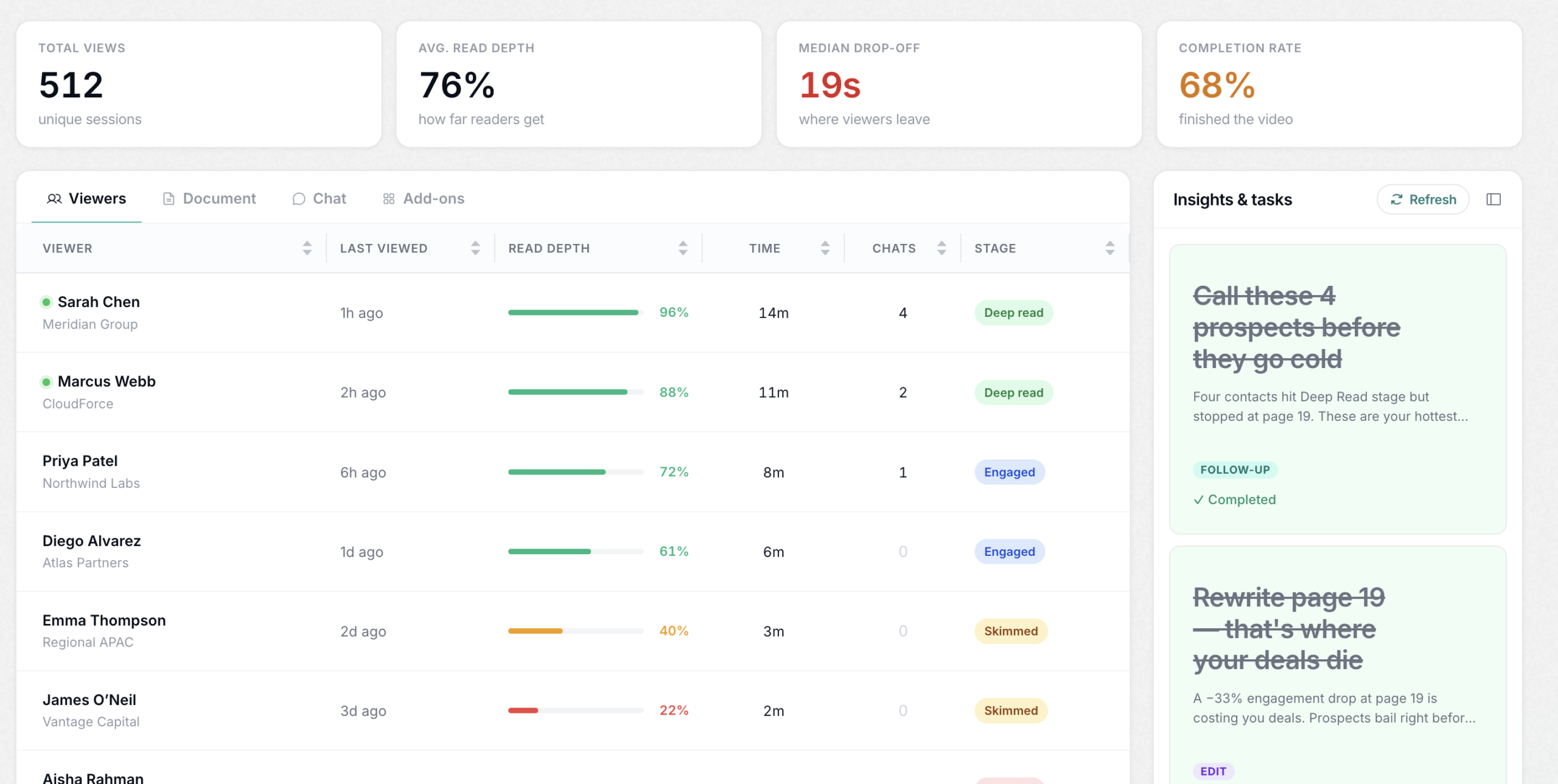
Full Libertify dashboard view showing engagement, comprehension, and conversation data in one place
Libertify — AI Learning Platform (Section: What Students Get)

One upload. Every way to learn.

Each course document becomes a full measurable learning experience automatically generated from your content


The Libertify Knowledge Hub showing eight automatically generated tools for one course chapter: video summary, audio podcast, AI-generated chapter summary, practice quiz, trivia flip cards, bookmarks, flashcards, and private notes.

Frequently asked questions

Everything you need to know about getting Libertify running inside the LMS you already use.

Libertify turns your existing training materials (PDFs, decks, documents) into an interactive course experience, video walkthrough, summary, quiz, and an AI chatbot learners can ask questions to, and deploys the result as a standard SCORM or LTI 1.3 package directly inside your LMS.
Any LMS that supports SCORM 1.2, SCORM 2004, or LTI 1.3 Advantage, which covers the large majority of platforms in use today, including Moodle and Chamilo. If your LMS can launch a standard course package or an LTI tool, it can launch Libertify.
No. Upload the materials you already use to train people and Libertify builds the interactive experience around them automatically. There is no content to rewrite and no course structure to rebuild from scratch.
Yes. Completion and score reporting pass back into your LMS the same way any other SCORM or LTI activity does, so it shows up in the gradebook your team already works from. Libertify's deeper engagement and comprehension analytics, who engaged with what, where they got stuck, what they asked, live in Libertify's own dashboard alongside that.
Yes. The built-in AI chatbot answers based only on the material in that course, so learners get a direct answer instead of guessing or opening a support ticket.
PDFs, PowerPoint decks, and Word documents, with no conversion needed beforehand. Upload what you already have and Libertify handles the rest.
Libertify is ISO 27001 certified and SOC 2 secured. Content stays tied to the course it was built from, and access follows the same LMS login your learners already use, there is no separate account to manage.

Still have questions? We're happy to help.