Video Resume: The Complete Guide to Standing Out in 2026
Table of Contents – What Is a Video Resume? (And Why It Matters in 2026) – Do Video Resumes Actually Work? [Data + Expert Insights] – How to Make a Video Resume in 7 Steps – Best Video Resume Examples That Got People Hired – Top 7 Video Resume Makers and Tools [2026 Comparison] – Video Resume vs. Traditional Resume: When to Use Each – Video Resume Tips from Hiring Managers – The Rise of TikTok-Style Video Resumes in 2026 – FAQ — Video Resume Questions Answered
You’ve sent 87 applications. Maybe 120. You’ve rewritten your resume four times, agonized over keywords, and tailored every cover letter. Radio silence.
Here’s what nobody tells you: it’s probably not your qualifications. It’s that your resume reads exactly like the other 249 sitting in that recruiter’s inbox. And in 2026 — with 64% of recruiters reporting a surge in identical, AI-generated resumes (HeroHunt.ai 2025) — “exactly like everyone else’s” is the default, not the exception.
A video resume changes the equation. Not because it’s flashy. Because when every written resume sounds the same, the medium becomes the message. A video resume proves you’re a real person who thinks differently — in 60 seconds flat.
But here’s what the other guides won’t tell you: you don’t need to be on camera to make one. You don’t need a ring light, a script coach, or film school confidence. The video resume category has evolved far beyond “point a camera at yourself and talk.”
This guide gives you everything you need to know about how to create a video resume for job applications: the real data on whether video resumes (or video CVs, as they’re known in Europe) work, a step-by-step process to create one, honest advice on when they backfire, and a complete breakdown of the tools available in 2026 — including approaches most guides don’t even know exist. Whether you’re a fresh graduate or a senior professional, you’ll leave with a clear plan.
Let’s get into it.
👉 Job seeker? See how Libertify transforms your resume into an interactive experience. Explore the Job Seekers page →
What Is a Video Resume? (And Why It Matters in 2026)
A video resume is a short 60-to-120-second recording where a job seeker introduces themselves, highlights key skills and experience, and showcases their personality to hiring managers. Unlike traditional paper resumes, video resumes let candidates demonstrate communication skills, enthusiasm, and cultural fit — qualities that text alone cannot convey. In 2026, AI-powered tools like Libertify make creating professional video resumes accessible to everyone.
A video CV (the terms are interchangeable — “video CV” is more common in Europe) can take several forms:
- Self-filmed talking head — You record yourself speaking directly to the camera
- Screen recording with narration — You walk through your portfolio or presentation while narrating
- AI avatar video — An AI-generated digital persona presents your resume content
- Document-to-video — Your existing PDF resume gets transformed into a polished video automatically, no camera required
That last category is the one most guides completely ignore — and it’s arguably the most practical for 2026. More on that in the tools section.
Why Video Resumes Matter Now More Than Ever
The timing isn’t coincidental. Three forces converged to make the video resume more relevant than at any point in the last decade:
1. AI made everyone identical. When ChatGPT writes your resume and your competitor’s resume and the other 248 applicants’ resumes, they all start to sound the same. 88% of hiring managers say they can tell when candidates use AI for applications (Insight Global 2025) — and they’re not impressed. A video resume is one of the few remaining formats where you can’t fake being you.
2. Application volume hit a wall. The average corporate job posting now attracts 250+ applications (Glassdoor via HiringThing). Job seekers submit anywhere from 32 to 200+ applications before landing an offer (The Interview Guys). In that volume, text resumes blur together. Video breaks through.
3. Video hiring went mainstream. HireVue alone has hosted 70+ million video interviews (HR Executive 2025). Trust in AI-assisted video hiring jumped from 37% to 51% among HR leaders between 2024 and 2025 (HireVue survey). The infrastructure and cultural acceptance for video in hiring is here.
Do Video Resumes Actually Work? [Data + Expert Insights]
Research shows that video resumes increase interview callback rates by up to 10 percentage points for roles where communication and personality matter — including sales, marketing, customer-facing, and creative positions. However, they work best as a complement to a traditional resume, not a replacement. The key is targeting companies that explicitly welcome or request video applications.
Let’s look at the strongest evidence we have.
The IZA Field Experiment: Real Numbers
The most rigorous study on video resume effectiveness comes from researchers at Université Laval, published as IZA Discussion Paper #13656. This wasn’t a survey or a self-reported study — it was a large-scale field experiment with 2,021 real firms in Québec.
The results:
- Callback rates jumped from 45% to 55.3% when able-bodied applicants included a video resume — a 10.3 percentage point increase
- Disabled applicants saw callbacks rise from 19.9% to 27.4% — a 7.5 percentage point boost
- The researchers concluded that video resumes lead to “better matches at the interview stage” because employers already have a sense of the candidate before the interview
That’s not a marketing claim. That’s a controlled experiment with thousands of data points.
The Honest Caveat
A word of intellectual honesty that most “video resume” articles skip: the IZA study tested secretary-receptionist roles using a professional actress. Results may not generalize perfectly to all roles and markets. The effect was strongest for positions where interpersonal skills are core to the job.
You’ll also find a “156% callback increase” stat floating around the internet. We couldn’t trace that to a verifiable source. The IZA data is the strongest evidence available — and a 10-percentage-point increase is genuinely meaningful when you’re competing against 250 applicants.
What Recruiters Actually Say
Not everyone is sold. And that’s important to understand before you invest time.
The supporters:
“Video links talent to opportunity. It’s largely aligning skills and workflow.” — Mike Hudy, Chief Science Officer, HireVue (HR Executive 2025)
“It is basically to ensure that you are articulate, personable, and confident. It is a personality screening.” — Recruiter on r/recruitinghell
The skeptics:
“I would never watch a video resume. Too much liability.” — HR professional on r/humanresources
“HR prefer to read and skip parts in your resume, better than watching you and not knowing which minute should jump to.” — Job seeker on r/Resume
The truth is that video resumes are polarizing — and that’s actually useful information. They work brilliantly in some contexts and backfire in others. The key is knowing the difference. (We cover exactly that in the when-to-use-each section.)
The Bias Paradox
Here’s where it gets nuanced. Critics argue that video resumes introduce discrimination risk — a recruiter can see your race, age, gender, and disability status before deciding whether to interview you. The EEOC itself warns: “Because viewing a video may trigger unconscious bias, especially if opportunities for face-to-face conversation are absent, covered entities should implement proactive measures to minimize this risk” (EEOC via CareerAttraction).
This is a real concern. But the data tells a more complex story:
- The IZA study found that disabled applicants also benefited from video (+7.5pp callback boost)
- Aptitude Research found that structured video assessments reduce bias by 62% compared to just 28% for traditional screening (HR Executive 2025)
The format itself isn’t inherently biased — the process around it determines whether it helps or hurts. Unstructured “just film yourself” video? Higher bias risk. Structured, tool-assisted video that standardizes the format? Actually less biased than a traditional resume review.
This matters for how you approach your own video resume: using a tool that creates a consistent, professional format (rather than a raw self-filmed clip) may actually work in your favor.
How to Make a Video Resume in 7 Steps
Whether you film yourself, use an AI tool, or convert your existing PDF, these seven steps cover every approach. Adapt them to your chosen method.
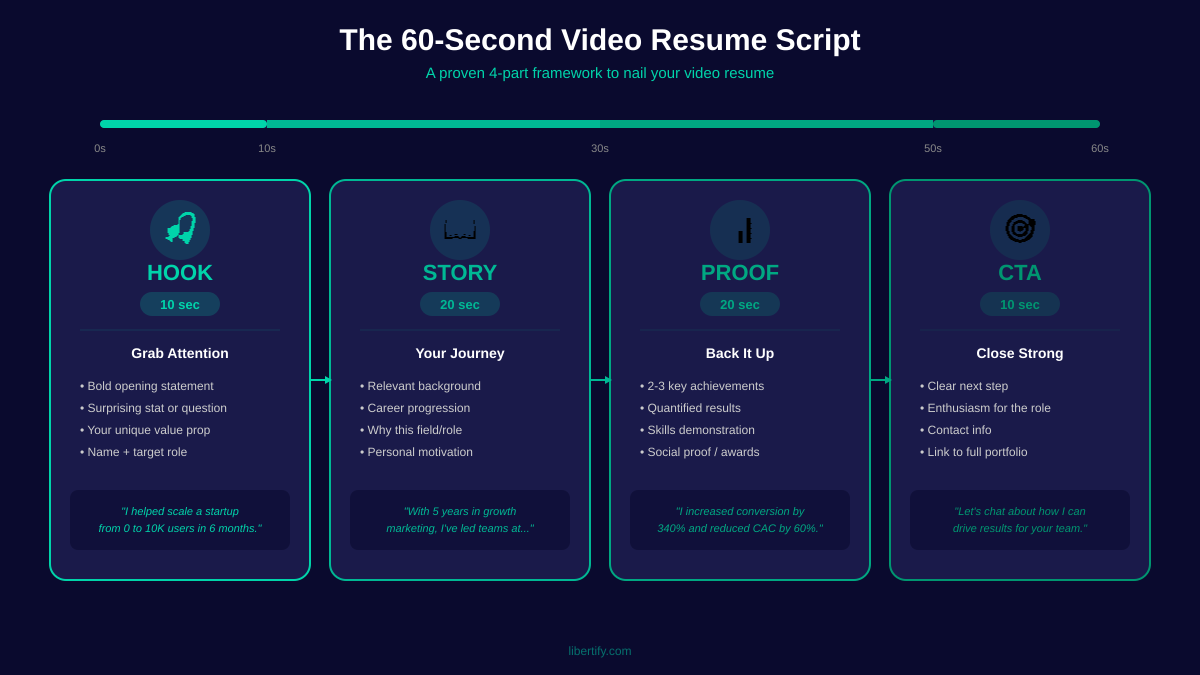
Step 1 — Write Your Video Resume Script
Your video resume script is the foundation. Even if you’re using a document-to-video tool that works from your existing resume, knowing what to emphasize matters.
The 60-second script framework:
| Section | Time | What to Say |
|---|---|---|
| Hook | 0-10 sec | Your name + a compelling one-liner about what you do and what you’re looking for |
| Value proposition | 10-30 sec | 2-3 key achievements with numbers. Not responsibilities — results |
| Relevance | 30-50 sec | Why this role/industry specifically. Connect your experience to their needs |
| CTA | 50-60 sec | What you want them to do next — “I’d love to discuss how I can help your team with [specific goal]” |
What to say in a video resume (and what to skip):
✅ Quantified achievements (“grew pipeline by $1.2M in 9 months”) ✅ Personality and energy that text can’t convey ✅ A specific connection to the target role or company ✅ A clear ask
❌ Your entire work history (that’s what the PDF is for) ❌ Generic claims (“I’m a team player with strong communication skills”) ❌ Salary expectations or reasons for leaving current role ❌ Anything you wouldn’t say in the first 60 seconds of an interview
Pro tip: Write your script, then cut it by 30%. Then cut another 10%. The best video resume scripts feel almost too short when you read them — and exactly right when you watch them.
Step 2 — Choose the Right Video Resume Maker
This is where most guides fail you. They assume “making a video resume” means propping up your phone and hitting record. In 2026, you have three distinct approaches:
Approach A: Film Yourself (DIY) Record yourself speaking on camera using your phone, webcam, or a tool like Loom. Highest authenticity, but also highest production barrier. You need decent lighting, clean audio, a presentable background, and — frankly — comfort on camera.
Approach B: AI Avatar Tools like HeyGen and Synthesia create an AI-generated avatar that presents your resume content. You type the script; a digital persona delivers it. Fast and polished, but there’s an authenticity gap — some recruiters may feel it’s impersonal or misleading.
Approach C: Document-to-Video (No Camera Required) This is the approach most people don’t know exists. Tools like Libertify transform your existing PDF resume into a professional video experience — no camera, no avatar, no performance anxiety. Your real content, elevated into a visual format with motion, structure, and engagement.
For the 70%+ of people who’d rather not film themselves, Approach C removes the biggest barrier to creating a video resume. You already have a resume. You just need a better format for it.
We break down specific tools in the comparison section below.
Step 3 — Set Up Your Recording Space
Skip this step if you’re using a document-to-video or AI avatar approach.
If you’re filming yourself, your environment matters more than your camera quality. Recruiters will forgive a slightly grainy image. They won’t forgive distracting backgrounds or echoing audio.
The minimum viable setup: – Lighting: Face a window for natural light, or use a desk lamp positioned in front of you (not behind). Avoid overhead fluorescents — they cast harsh shadows – Background: Clean, uncluttered. A plain wall, a tidy bookshelf, or a professional-looking space. Blur your background if needed – Audio: The most underrated factor. Use earbuds with a built-in mic at minimum. External noise kills credibility faster than anything else – Camera angle: Eye level, slightly above center. Your phone on a stack of books works perfectly — no tripod needed – Dress code: Wear what you’d wear to an interview at that specific company. When in doubt, business casual. Avoid busy patterns and bright whites
Step 4 — Record Your Video Resume
How long should a video resume be? Aim for 60 to 90 seconds. That’s it.
The ideal video resume length is 60 to 90 seconds. Hiring managers spend an average of 7 seconds scanning a written resume, so a concise video that respects their time while delivering a memorable introduction is far more effective than a lengthy production. Keep it under two minutes maximum.
Recording tips for a professional video resume: – Do 3-5 takes minimum. Your first take is a warm-up, not the final product – Speak to a specific person, not “the camera.” Imagine the hiring manager sitting across from you at a coffee shop – Vary your tone. Monotone is the kiss of death. Energy ≠ shouting — it means genuine enthusiasm – Smile naturally at the beginning and end. It sounds obvious, but nervous speakers forget – If you stumble, keep going. Minor imperfections make you seem human. Robotic perfection feels… robotic
Step 5 — Edit and Add Captions
Whether you filmed yourself or used a video resume template from an AI tool, polish matters.
Essential edits: – Trim dead air at the beginning and end. Start strong, end clean – Add captions. This is non-negotiable. Many recruiters watch with sound off, especially during initial screening. Captions also improve accessibility and comprehension – Include your name, target role, and contact info as a text overlay in the first 5 seconds – Add a simple title card at the start if you want a creative video resume feel – Keep transitions minimal. Cross-dissolves, yes. Star wipes, absolutely not
Free editing options: CapCut, Clipchamp (free with Microsoft 365), iMovie, or DaVinci Resolve. All handle basic resume video editing.
Step 6 — Optimize for ATS and Recruiters
Here’s the uncomfortable truth: most Applicant Tracking Systems cannot process video files. If you submit a video resume as your only application material, it may be completely invisible to the system.
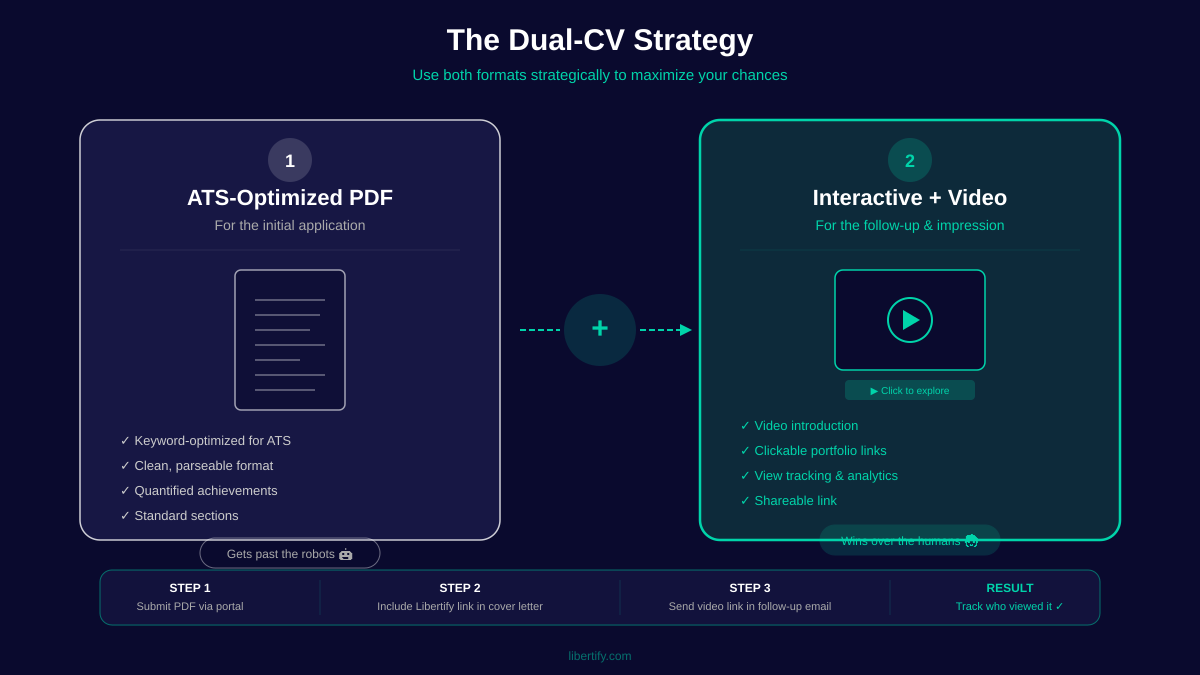
This is why the Dual-CV Strategy is essential:
- Your ATS-optimized PDF — Submit this through formal application portals. Keywords, clean formatting, parseable structure. This gets through the digital gates
- Your video resume link — Include this in your LinkedIn outreach, networking emails, and in a “Portfolio” or “Website” field on job applications. This is your differentiator
Your PDF opens the door. Your video resume is the tiebreaker.
Pro tip: Host your video resume on a platform that gives you a clean, shareable link and — ideally — view analytics. Knowing that a recruiter watched your video at 3 PM on Tuesday gives you the perfect reason to send a follow-up at 4 PM on Tuesday.
Step 7 — Share and Track Results
Where and how you share your video resume matters as much as what’s in it.
High-impact sharing strategies: – LinkedIn: Add the link to your Featured section, your About summary, and include it when messaging recruiters directly. Don’t post it publicly unless you’re comfortable with that visibility – Email outreach: “I’ve attached my resume, and here’s a 60-second video introduction: [link].” Simple, professional, and immediately intriguing – Job application “Website” field: Many ATS platforms have an optional website or portfolio URL. Use it – QR code on your PDF resume: For in-person networking, career fairs, and printed resumes. A small QR code in the header linking to your video resume bridges physical and digital – Follow-up messages: After submitting a formal application, send a brief follow-up to the hiring manager with your video link. This is where video resumes create the most callback lift
Best Video Resume Examples That Got People Hired
What does a great video resume actually look like? Here are three archetypes that work across different experience levels and industries.
Video Resume Example for Freshers
The challenge: No work experience to showcase. Every other fresh graduate has the same degree, the same internship structure, the same “eager to learn” bullet points.
What works: A video resume for freshers should lean into what you do have: energy, personality, and the specific reason you’re passionate about this field. A 60-second video where a recent graduate explains why they chose their major, shares a class project that mirrors real work, and demonstrates genuine curiosity about the company will outperform 100 text resumes that say “detail-oriented self-starter.”
Structure: – 10 sec: Name, degree, and a one-line hook (“I built a supply chain model in my senior thesis that saved my university’s dining services $40K — and I want to do that at scale”) – 30 sec: One or two specific projects or experiences, with outcomes – 15 sec: Why this company/role specifically (research them — specificity wins) – 5 sec: CTA
Video Resume Example for Creative Roles
The challenge: Standing out in a field where everyone is trying to stand out.
What works: For creative roles — design, content, video production, marketing — your video resume is your portfolio piece. The production quality, storytelling, and visual design of the video itself demonstrates your skills. A creative video resume for a motion graphics designer might use kinetic typography. A social media manager might structure theirs like a TikTok. A copywriter might rely on sharp, witty scripting with minimal visuals.
Structure: – Show, don’t tell. Open with 5 seconds of your best work, then introduce yourself – Weave examples of your work into the narrative rather than just talking about them – Let your style speak. If you’re applying to a playful brand, your video should feel playful. If you’re targeting a luxury brand, keep it sleek and minimal
Video Resume Example for Corporate Roles
The challenge: Looking professional without looking generic. Senior professionals often worry a video resume feels “junior” or gimmicky.
What works: For corporate, consulting, and senior roles, the video resume should feel like a confident executive summary — not a performance. Think: “I’m going to save you 15 minutes of reading by telling you exactly what I bring to this role.” Document-to-video tools are particularly effective here because they maintain the professional structure of a traditional resume while adding the engagement of video.
Structure: – 10 sec: Name, current/most recent title, and the headline result (“I’ve led three digital transformations generating $50M+ in cost savings”) – 30 sec: Two to three career highlights directly relevant to the target role – 15 sec: Your leadership philosophy or approach in one sentence, plus why you’re exploring this opportunity – 5 sec: CTA — “I’d welcome a conversation about [specific challenge you know the company faces]”
Top 7 Video Resume Makers and Tools [2026 Comparison]
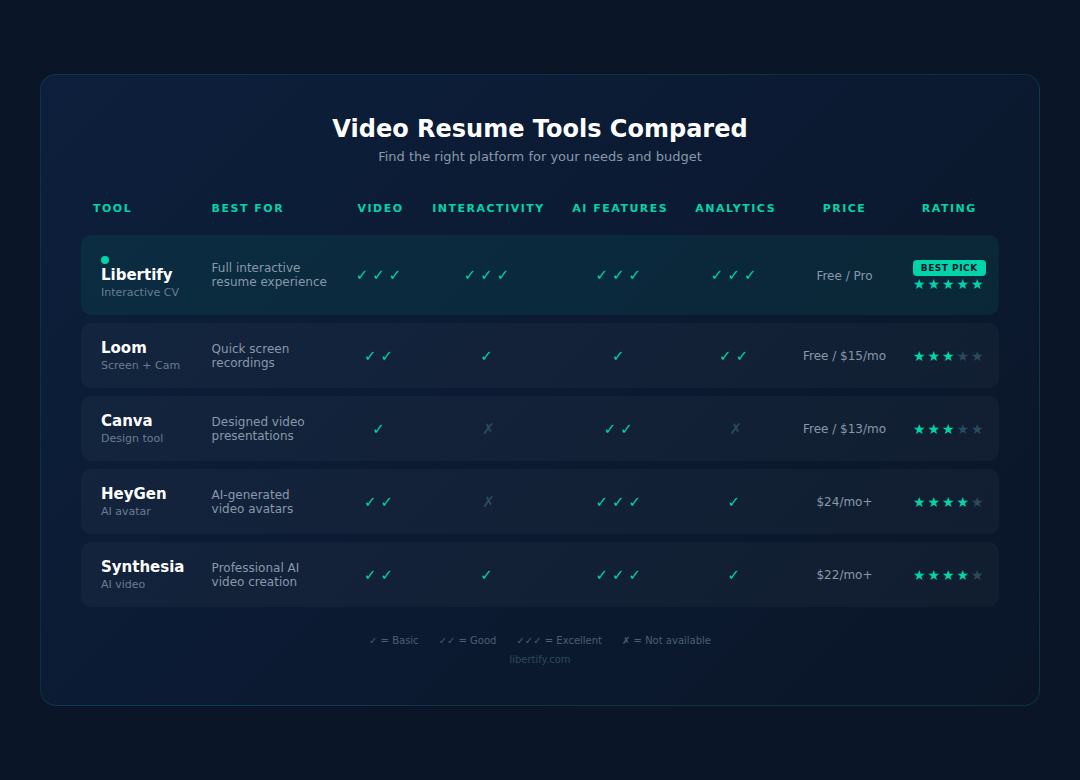
Not all video resume makers are created equal. Whether you’re looking for a video resume app for quick mobile creation or a full desktop video resume maker, here’s an honest breakdown of seven tools across the three main categories, so you can pick the right one for your situation. Each tool approaches the video resume for job applications differently.
Libertify — AI-Powered Video Resume Builder
Category: Document-to-Video Price: Free tier available | See pricing Best for: Anyone who wants a professional video resume without filming themselves
Libertify takes a fundamentally different approach to the video resume. Instead of asking you to perform on camera or use a digital avatar, you upload your existing PDF resume and the AI transforms it into a polished, navigable video experience. Your content. Your achievements. Presented in a format that’s engaging, professional, and watchable.
Why it stands out: – No camera, no avatar, no performance anxiety – Works from the resume you already have – Built-in analytics (see who viewed your video and when) – Professional, consistent output regardless of your design skills – Pairs perfectly with the Dual-CV Strategy — your PDF goes to ATS, your Libertify link goes to humans
Best for: Job seekers at any level who want to add video to their application without the production burden. Particularly strong for corporate professionals, career changers, and anyone who’d rather not be on camera.
Canva Video Resume Templates
Category: Template-Based Editor Price: Free tier | Pro: $13/mo Best for: DIY creators who want visual templates
Canva offers video resume templates that you customize with your content. Drag-and-drop editing, stock footage, text animations. The output looks polished if you put in the time, but you’re essentially building a video from scratch using templates as a starting point.
Trade-off: More creative control, but 2-5 hours of work vs. minutes. Quality depends heavily on your design eye.
Clipchamp Video Resume Maker
Category: DIY Video Editor Price: Free with Microsoft 365 Best for: Self-filmed video resumes that need basic editing
Microsoft’s Clipchamp is a capable browser-based video editor. It won’t create your video resume for you, but if you’ve filmed yourself talking, it handles trimming, captions, transitions, and text overlays well. No resume-specific features — you’re using a general video editor.
Trade-off: Free and solid, but you need to film your own footage first.
Renderforest Video CV
Category: Template-Based Animation Price: Free tier (watermark) | Paid from $10/mo Best for: Animated explainer-style video resumes
Renderforest offers resume-specific video templates with animated characters, infographic-style layouts, and motion graphics. You plug in your information, choose a style, and it renders a video. Good for creative roles where an animated approach feels appropriate.
Trade-off: The output can feel generic if you don’t customize heavily. Some templates look dated.
Loom for Video Introductions
Category: Screen/Webcam Recording Price: Free tier | Business: $15/mo Best for: Tech roles and async communication
Loom isn’t technically a “video resume maker,” but it’s become a popular tool for video introductions in tech hiring. Record your screen and webcam simultaneously — great for walking through a portfolio, demonstrating a product you built, or giving a technical overview.
Trade-off: The output looks like a Loom recording (informal, screen-share style), not a traditional video resume. Perfect for startups and tech; less appropriate for corporate roles.
Animaker Video Resume Software
Category: Animated Video Creator Price: Free tier | Paid from $12.5/mo Best for: Eye-catching animated resumes for creative fields
Animaker lets you create animated video resumes with characters, scenes, and visual storytelling. If you’re applying for a role in animation, education, or creative marketing, an animated video resume can showcase relevant skills while delivering your career story.
Trade-off: Time-intensive (4-8 hours for a good result). Can feel gimmicky if the role doesn’t call for animation.
CapCut Video Resume Templates
Category: Mobile-First Video Editor Price: Free Best for: Quick, mobile-edited video resumes
CapCut (by ByteDance) has become the go-to free video editor, especially for younger job seekers comfortable with TikTok-style editing. Resume-specific templates, auto-captions, and trendy effects make it easy to create a polished video from your phone.
Trade-off: The aesthetic skews young and social-media-native. Great for media, marketing, and startup roles; less suitable for conservative industries.
Video Resume vs. Traditional Resume: When to Use Each
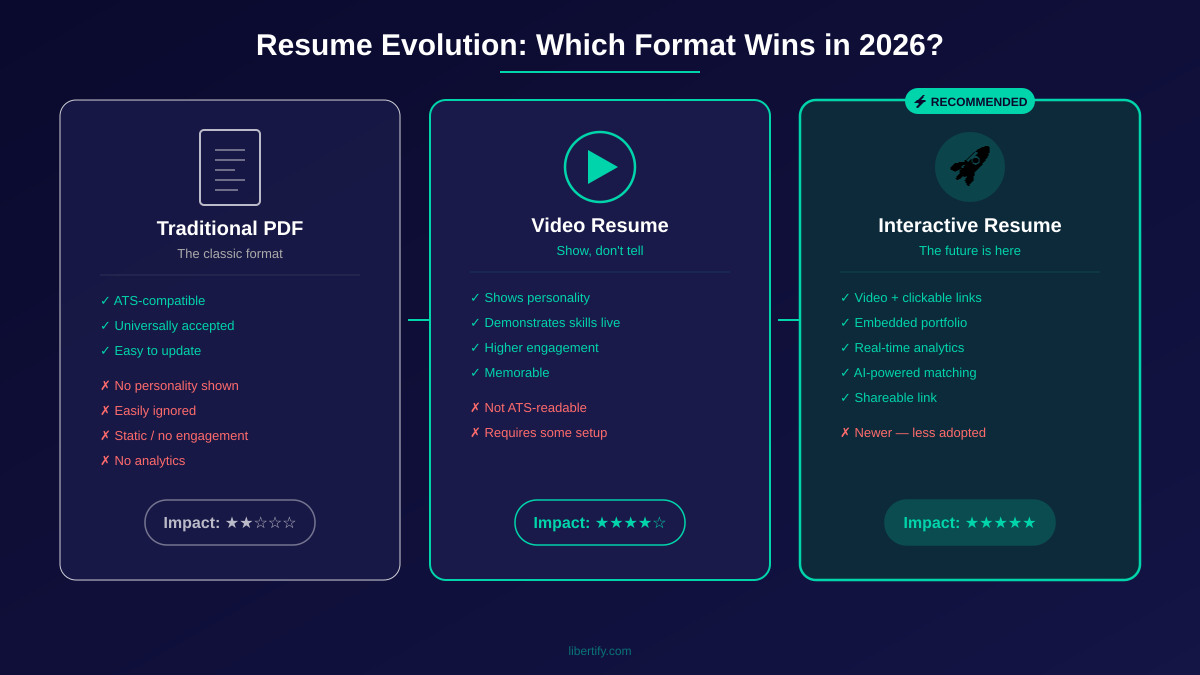
A video resume is not a replacement for your traditional resume. It’s a different tool for a different purpose. Here’s when to use each — and when video can actually hurt you.
The Comparison
| Traditional PDF Resume | Video Resume | |
|---|---|---|
| ATS compatible | ✅ Yes | ❌ No |
| Recruiter time to review | 7 seconds (scan) | 60-90 seconds (watch/interact) |
| Shows personality | ❌ Limited | ✅ Strongly |
| Bias risk | Lower (no visual cues) | Higher (unless using document-to-video) |
| Best for | Formal applications, ATS portals | Direct outreach, networking, shortlist tiebreakers |
| IZA callback boost | Baseline (45%) | +10.3pp (55.3%) — for communication-heavy roles |
| Production effort | Low | Low (AI tools) to High (DIY filming) |
When Video Resumes ADD Value
- Creative fields: Design, content, video production, marketing — the video is a work sample
- Sales and customer-facing roles: Communication skills are the product; video demonstrates them
- Startups and tech: Culture-forward hiring, open to non-traditional formats
- Remote roles: When you’ll never meet in person before hiring, video builds trust faster
- Career changes: Video lets you explain your narrative in a way bullet points can’t
When NOT to Use Video Resumes
Let’s be honest about when a video resume can backfire:
- Finance and banking: Conservative culture. Many firms’ legal teams specifically advise against accepting video applications to avoid discrimination liability
- Legal: Ironic, given employment law — but many law firms reject non-standard formats for exactly those legal reasons
- Government and public sector: Standardized processes. Non-standard formats may be ignored or disqualified
- Any role with strict ATS-only submission: If the application portal only accepts PDF/DOCX uploads with no website/portfolio field, your video has nowhere to go
- When the job posting says “no video applications”: It happens. Respect it
The Dual-CV Strategy (Your Best Move Regardless)
Borrowed from our interactive resume guide, the Dual-CV Strategy gives you maximum coverage:
- Your ATS-optimized PDF → Submit through formal portals. Keywords, clean formatting, machine-parseable. This gets through the automated gates
- Your video resume link → Share via LinkedIn, email outreach, networking. This is your human-to-human differentiator
Two formats. Two purposes. Complete coverage.
Your PDF opens doors. Your video resume is the reason they remember you when they have 10 finalists on the shortlist.
Video Resume Tips from Hiring Managers
What Recruiters Actually Look For
We analyzed recruiter feedback across hiring forums, industry reports, and direct conversations. The pattern is consistent: recruiters don’t want a production. They want a signal.
They’re looking for: – Communication clarity — Can you explain who you are and what you offer in 60 seconds? That’s a skill in itself – Genuine energy — Not hype. Not scripted enthusiasm. Real engagement with the work you do – Relevance — Did you tailor this to the role, or does it feel like a blast to 50 companies? – Professionalism — Clean audio, decent lighting (if filming), appropriate dress. The bar isn’t high — it just needs to feel intentional
They’re NOT looking for: – Hollywood production quality – Special effects or fancy transitions – A 5-minute documentary about your life – A rehearsed performance that sounds like a teleprompter read
57% of hiring managers spend 1-3 minutes reviewing a resume (Resume Genius 2024). A 60-second video fits perfectly within that attention window — and uses it far more effectively than a text scan.
Common Video Resume Mistakes to Avoid
- ❌ Making it too long. Over 2 minutes and you’re losing them. Respect their time or lose their attention
- ❌ Reading your resume verbatim. If your video just recites what’s on paper, why would they watch it? Add personality, context, and the why behind your achievements
- ❌ Bad audio. Echoey rooms, background noise, and wind from an outdoor setting kill credibility faster than a shaky camera
- ❌ No clear CTA. What should the recruiter do after watching? If you don’t tell them, they’ll do nothing
- ❌ Being too casual OR too stiff. Aim for “confident professional at a networking event” — not “reading a legal brief” and not “talking to your buddy”
- ❌ Ignoring captions. Many recruiters review applications on mute, especially in open offices. No captions = no message
Industry-Specific Tips (Tech, Creative, Finance)
Tech roles: Screen-record a walkthrough of a project you built. Show your GitHub, a live demo, or an architecture diagram while narrating. Loom is your friend. Technical talent is best demonstrated, not described.
Creative roles: Your video resume IS your audition tape. Production quality, storytelling, and visual design all matter because they’re relevant to the job. Go beyond talking — show your work in motion.
Finance and corporate: If you choose to make a video for a more conservative field, lean toward the document-to-video approach. A professionally formatted video that presents your career summary without requiring you to perform on camera reads as executive-level, not gimmicky. Keep it under 60 seconds. Lead with numbers. End with a professional CTA.
The Rise of TikTok-Style Video Resumes in 2026
Something unexpected happened in 2024-2025: job seekers started posting video resumes on TikTok and Instagram Reels. Some went viral. Some got hired. And a new micro-genre was born.
What’s different about TikTok-style video resumes: – 30-60 seconds (shorter than traditional video resumes) – Vertical format (9:16 instead of 16:9) – Trending audio and quick cuts — the visual language of social media – Public by default — these are designed to be shared, not sent privately to a recruiter
When it works: Media companies, social-first brands, influencer marketing roles, and any company that lives on these platforms. If you’re applying to be a social media manager and your video resume is a well-crafted Reel, you’ve just submitted the most relevant work sample possible.
When it backfires: Anywhere that “going viral” isn’t part of the job description. A TikTok-style video resume for an accounting position at a regional bank will not land the way you hope.
The practical middle ground: Create a professional video resume using the steps above, but also create a shorter, punchier version optimized for LinkedIn and social sharing. Different platforms, different formats, same core message. This is content atomization applied to your career.
Ready to Stand Out?
Join thousands of job seekers using interactive resumes to land more interviews.
See How It Works →FAQ — Video Resume Questions Answered
What is a video resume?
A video resume (also called a video CV) is a short recording — typically 60 to 90 seconds — where you present your professional background, key skills, and career goals to potential employers. It supplements your traditional resume by showcasing personality, communication skills, and enthusiasm that text alone can’t convey. In 2026, video resumes range from self-filmed introductions to AI-generated videos created from your existing PDF.
Do video resumes work?
Yes, with important caveats. The IZA field experiment with 2,021 firms found that video resumes increased callback rates from 45% to 55.3% for communication-heavy roles (IZA Discussion Paper #13656). They’re most effective for sales, marketing, creative, and customer-facing positions — and work best as a complement to a traditional resume, not a replacement.
How long should a video resume be?
Keep it between 60 and 90 seconds. Hiring managers are time-poor — 57% spend just 1-3 minutes on a full resume review (Resume Genius). A concise video that respects their time while delivering a memorable introduction outperforms a lengthy production every time. Never exceed two minutes.
Should I make a video resume?
It depends on your target industry and role. If you’re applying for roles where communication, personality, or creativity matter — yes, it can significantly boost your chances. If you’re targeting conservative industries like finance, legal, or government through formal ATS portals — lead with your traditional resume and save the video for direct outreach. The Dual-CV Strategy (PDF + video link) covers both scenarios.
What should I say in a video resume?
Open with your name and a one-line hook about what you do. Spend 20-30 seconds on your top 2-3 achievements (with numbers). Then connect your experience to the specific role or company. Close with a clear call to action — “I’d love to discuss [specific topic].” Skip generic claims like “team player” and never read your resume verbatim.
Are video resumes effective in 2026?
More effective than ever, for three reasons: (1) AI-generated text resumes have created a homogeneity problem — 64% of recruiters see look-alike applications — making video a differentiation tool, (2) remote and hybrid hiring has normalized video in recruitment workflows, and (3) new tools like Libertify now let you create professional video resumes without filming yourself, removing the biggest barrier to adoption.
How do I send a video resume?
Include a video resume link (not a file attachment) in three places: your LinkedIn Featured section, the “Website” or “Portfolio” field on job applications, and in direct outreach emails to hiring managers. Use a platform that provides a clean, shareable URL and view analytics. For in-person networking, add a QR code to your printed resume that links to your video.
What’s the best video resume app for beginners?
If you want a dedicated video resume app, Libertify is the simplest option — upload your PDF and get a video CV in minutes, no filming required. For those who prefer to film themselves, Canva and Clipchamp offer mobile-friendly templates. The best video resume app depends on whether you want to be on camera or not.
What should I wear in a video resume?
Dress one level above what you’d wear on a typical day at that company. Business casual is the safe default for most industries. Avoid busy patterns, bright white shirts (they blow out on camera), and anything distracting. For creative roles, let your style reflect your personality — authenticity matters more than formality. The rule: look intentional, not overdressed.
Your Resume Is Good Enough. The Format Isn’t.
Here’s what it comes down to: you’re not losing opportunities because of what’s on your resume. You’re losing them because 250 other people submitted something that looks exactly like it, and nobody has time to read them all carefully.
A video resume doesn’t guarantee you’ll get hired. Nothing does. But it does guarantee one thing: the recruiter who clicks your link will spend 60-90 seconds with you instead of 7 seconds. They’ll hear your voice, see your energy, and get a sense of who you are beyond bullet points. And in a world where 96% of recruiters use AI tools in their hiring process (MyPerfectResume) and 83% of companies plan to use AI for resume screening by 2025 (Resume Builder, via The Interview Guys), that extra 83 seconds of human attention is worth everything.
You don’t need a film crew. You don’t need to be “good on camera.” You don’t even need to be on camera at all.
You just need to give your resume a format that matches how good you actually are.
Ready to turn your resume into a video? Upload your PDF and get a video resume in 5 minutes → | See how it works | Browse resume templates